I did some screen shots of my computer.
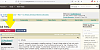
You should be able to click on the "Go Advanced" as Peckish posted
Originally Posted by
Peckish
- Click "go advanced" (button is at bottom of the reply box).
- Scroll down and click "Manage attachments"
- Make the box that pops up bigger, so you can see the right border of the box. Just click and drag the outer edge of the box.
- Click "browse" and select your picture.
- Click "upload" on the right side of the box.
- Click "close this window".
- Click "submit reply" when you're finished with your post.
A picture of the Reply & Go Advanced at the bottom of the page.
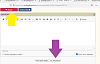
Please note to find the "upload" button you will have to scroll way over to the right of the window. Sometimes it takes a little bit.
Also do NOT click on preview as you will lose the attachments.
Janey - Neat people never make the exciting discoveries I do.
Not affiliated with off-site link(s)